There was a time when the Meta pixel saw almost everything. Someone clicked an ad, browsed, left, came back a week later and bought, and Ads Manager joined the dots with impressive accuracy. Interest targeting was precise, lookalikes were sharp, and reported results lined up reasonably well with the bank account.
That era ended with Apple's App Tracking Transparency prompt, which asks iPhone users whether apps can track them across other apps and websites. Many people say no. Add Safari and Firefox blocking third-party cookies by default, ad blockers, consent banners and shorter cookie lifetimes, and the browser-based pixel now sees a much patchier picture than it used to.
The good news is that Meta advertising still works, and works well, for businesses that have adapted. The approach has shifted from tracking individuals across the web to sending better first-party signal and letting the system do more of the targeting. Here's what still works in 2026, and what to stop relying on.
What actually changed
It helps to separate three things that often get lumped together.
- Apple's privacy changes limit what apps, including Facebook and Instagram, can track about iPhone users outside the app. This reduced the conversion data Meta receives and weakened some behavioural and interest signals.
- Browser restrictions on third-party cookies and tracking scripts, led by Safari and Firefox, mean pixel events go missing more often, especially on Apple devices.
- Chrome's third-party cookies are a different story from the one you may have heard. Google spent years planning to phase them out, then changed course. In 2025 it confirmed Chrome would keep its existing approach of letting users choose in their settings, and it has since retired most of the Privacy Sandbox technologies that were meant to replace cookies. So third-party cookies haven't disappeared, but they're no longer something to build a strategy on.
The practical takeaway is the same regardless of which change hits you hardest: signal loss is permanent, so plan around first-party data.
1. The Conversions API is no longer optional
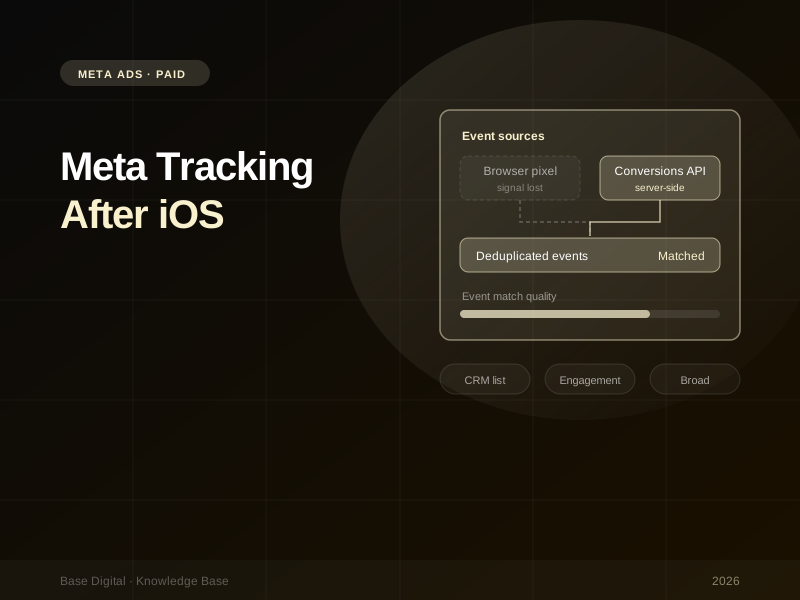
The pixel runs in the visitor's browser, which is exactly where blocking happens. The Conversions API sends the same events (purchases, leads, sign-ups) directly from your server or platform to Meta. It isn't affected by browser restrictions in the same way, and it can carry extra customer information, hashed, to help Meta match the event to a person.
Set it up alongside the pixel, not instead of it. Send the same event from both, with a shared event ID, and Meta deduplicates them. You get the pixel's browser context plus the server's reliability.
Most platforms make this simpler than it used to be. Shopify, WooCommerce and many CRMs have native integrations, and Events Manager can set up a basic connection for existing pixels. For custom sites, server-side tagging through a tag management server gives you more control over what's sent.
Check your Event Match Quality. In Events Manager, each event has an Event Match Quality score showing how well the customer information you send can be matched to Meta accounts. Passing email and phone (hashed) on purchases and leads is usually the quickest improvement.
If your pixel isn't set up properly in the first place, start with our guide on how to install the Meta pixel, then layer the Conversions API on top.
2. First-party audiences hold up better than interests
Detailed interest targeting relied heavily on the cross-app behaviour that Apple restricted. It still exists, but it's less precise than it was. Audiences built from data you own are far more reliable.
- Customer list Custom Audiences. Upload customers, past enquiries or email subscribers from your CRM. Use them to exclude existing customers from acquisition campaigns, to target upsells, and as seed audiences.
- Engagement audiences. People who've watched your videos, engaged with your Instagram or Facebook page, or opened a lead form. These are built from activity inside Meta's own apps, so they aren't affected by off-platform tracking limits in the same way website audiences are.
- Website audiences. Still useful, but expect them to be smaller than your real traffic. The Conversions API helps here too.
The same principle applies across platforms. Google's Customer Match does the job of Meta's customer list audiences on the Google side. The businesses doing best right now are the ones actively growing their first-party data through email sign-ups, accounts, loyalty programs and genuinely useful lead magnets.
"The best targeting signal you have now is your creative and your customer list, not an interest category."
3. Go broad, and let creative do the targeting
This is the shift many advertisers resist the longest. With less precise interest data, narrow targeting often does more harm than good: it limits the pool the algorithm can learn from and pushes up costs.
Broad targeting (location, age where it genuinely matters, and little else) combined with strong conversion data usually performs better now. The creative then becomes the targeting. A video that speaks directly to first-home buyers will find first-home buyers, because those are the people who stop, watch and click, and the system learns from that.
That means creative diversity matters more than ever:
- Different formats: short video, static images, carousels, user-generated style content
- Different angles: price, quality, convenience, social proof, a specific problem solved
- Different audiences implied in the creative itself, so the system has distinct "hooks" to match to different people
Ten variations of the same image with different headlines isn't diversity. Several genuinely different concepts is.
4. Use Advantage+ campaigns, with eyes open
Meta's automated campaign options lean into exactly this approach. Advantage+ shopping campaigns have been replaced by Advantage+ sales campaigns, alongside Advantage+ app and Advantage+ leads campaigns. They automate audience, placement and budget decisions within a single campaign.
They work best when you give them clean conversion data (pixel plus Conversions API), a good volume of varied creative, and enough budget to learn. Two things to watch: use your customer list to understand how much spend is going to people who already buy from you, and judge results against your own sales data, not just Ads Manager.
5. Expect under-reporting, and measure accordingly
Even with everything set up well, Ads Manager will not see every conversion it drove, and it may claim some it didn't. Your job is to triangulate rather than trust any one number.
Know your attribution setting
Each ad set has an attribution setting that controls which conversions are counted and optimised for. Meta's default counts conversions after a link click within a set window, plus view-through and engagement-based conversions within one day. View-through conversions in particular can flatter results, so look at click-only numbers using the compare attribution settings view before drawing conclusions. Make sure everyone reading the reports knows which setting is in use.
Cross-check with GA4 and your CRM
- GA4 will usually show fewer conversions from Meta than Ads Manager, because it uses a different attribution model and only sees sessions with tracking parameters. Tag every ad with consistent UTMs so the comparison is at least fair. Our guide to the GA4 metrics that matter covers what to look at.
- Your CRM or store backend is the source of truth for revenue and lead quality. Compare total new customers and revenue against total ad spend over time, not just platform-reported ROAS.
- Incrementality. For larger budgets, holdout tests and Meta's conversion lift studies answer the question that actually matters: what would have happened without the ads?
No single source is "right". If Ads Manager, GA4 and your CRM all move in the same direction, you can make decisions with confidence.
6. Contextual relevance is back
With less individual-level tracking, relevance to the moment matters more. That means creative that fits the placement (Reels-native video for Reels, not a resized TV ad), messaging timed to seasons and local events, and offers relevant to where someone is in the decision. It's an old-fashioned principle that has become a competitive advantage again.
Your quick checklist
- Pixel installed and firing correctly on all key events
- Conversions API connected and deduplicating with the pixel
- Domain verified in your business settings, with Event Match Quality checked in Events Manager
- Customer lists uploaded and refreshed regularly
- Broad targeting tested against narrow interest targeting
- A steady pipeline of genuinely different creative concepts
- UTMs on every ad, and a regular comparison against GA4 and your CRM
The bottom line
Meta ads didn't stop working after iOS. The old shortcuts did. Precise interest targeting and near-perfect tracking have given way to a model that rewards first-party data, server-side tracking, varied creative and honest measurement.
If you haven't got the foundations in place yet, start with our Meta pixel installation guide. If you'd like help rebuilding your tracking and campaign setup, talk to us about Meta Ads management.