Most business blogs grow the same way. Someone has an idea, writes a post, publishes it and moves on. A few years later there are dozens of articles that don't link to each other, overlap in places, miss obvious questions in others, and rank for very little. Each post is fine on its own. Together they don't add up to anything.
A content cluster fixes that. Instead of publishing one-off posts, you build a connected set of pages that cover a topic properly, so search engines and AI tools can see that your site is a genuine authority on it. Here's how we plan and build them.
What a content cluster actually is
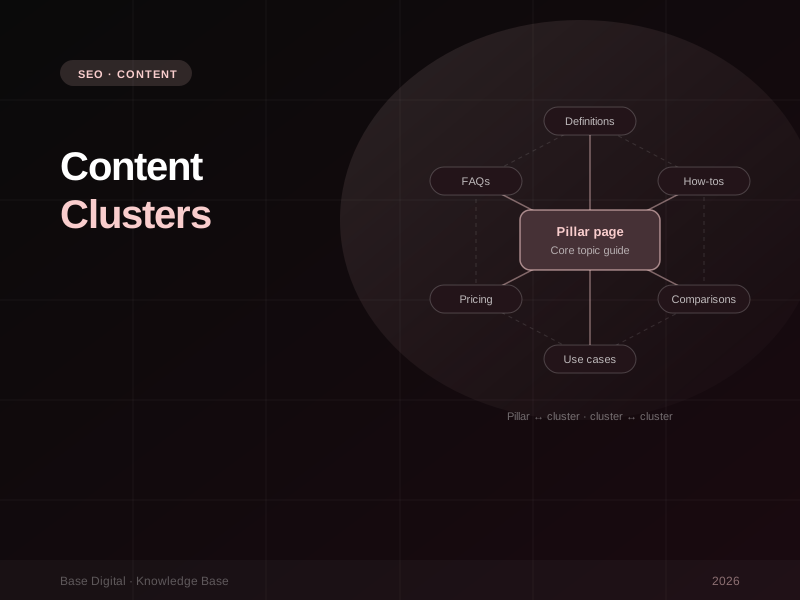
A cluster has three parts:
- A pillar page. A comprehensive guide to the core topic, written for someone who wants the full picture. It answers the main question well and points to deeper resources for each subtopic.
- Cluster articles. Focused pages that each cover one specific subtopic, question or use case in depth.
- Internal links. The structure that ties it together. The pillar links out to every cluster article, every cluster article links back to the pillar, and cluster articles link to each other where it genuinely helps the reader.
The links are not an afterthought. They're how both people and crawlers move through the topic, and they're what signals that these pages belong together. Google's own guidance on AI features makes the point that content should be findable through internal links. A cluster with weak linking is just a pile of related posts.
"One great article can rank. A connected set of great articles can own the topic."
Step 1: Choose the right topic
The best cluster topics sit at the intersection of three things: what you sell, what your customers search for, and where you already have some visibility. That last point is the one most people skip.
Start with Search Console. Look at the queries and pages where you already earn impressions, especially those sitting just off page one. If you're getting impressions for a handful of related terms around a service, Google already associates you with that area. Building a cluster there is far quicker than starting from scratch on a topic where you have no presence at all.
Good questions to ask when choosing a topic:
- Is it directly connected to a service or product that makes money?
- Is there enough to say to support a pillar and a meaningful set of supporting articles?
- Are there real questions, comparisons and decisions within it, not just one keyword?
- Do we have genuine experience and expertise to add, or would we just be rewriting what's already out there?
- Is it narrow enough that we can realistically become one of the best resources on it?
There's no magic search volume threshold. A specialist B2B topic with modest volume and high-value buyers can be worth far more than a broad consumer topic with huge volume and no commercial intent. Judge it on fit and value, not just the size of the number in a keyword tool.
Step 2: Map the cluster to real queries
Once you've chosen the topic, map out every cluster article before you write anything. Each article should target a specific query or tightly related group of queries, and no two articles should compete for the same one.
The Search Console Performance report is the best starting point because it shows what real people searched before finding you. Filter by page to see which queries your existing content is surfacing for, and filter by query to find terms that bring impressions but no strong page. Our Google Search Console guide walks through those reports in detail.
Then fill the gaps. A complete cluster usually covers four kinds of content:
- Definitions and explainers. What is it, how does it work, why does it matter. These help people early in their research and help machines understand the topic.
- How-to guides. Step-by-step articles for the practical tasks within the topic.
- Comparisons. Option A vs option B, alternatives, pros and cons, costs. These attract people close to a decision.
- Use cases by buyer segment. The same topic explained for different audiences, industries or situations, such as small businesses versus enterprise, or first-time buyers versus those switching providers.
Keep the map in a simple spreadsheet: the article title, its target query, the search intent, the buyer stage, and which other cluster articles it should link to. That one sheet keeps writers, editors and developers on the same page.
Audit before you write. Most sites already have content that belongs in the cluster. Update, merge or redirect existing posts first. Two thin articles competing for the same query are almost always better combined into one strong page.
Step 3: Build a pillar that's comprehensive, not padded
There's no ideal word count for a pillar page. The right length is whatever it takes to cover the topic properly and not a sentence more. Readers can tell when content has been stretched to hit a target, and so can search engines.
A strong pillar page usually:
- Opens with a clear, direct answer to the main question in the first paragraph.
- Gives a genuine overview of each subtopic, enough to be useful on its own.
- Links to the relevant cluster article at each point where a reader might want more depth.
- Includes first-hand material: examples from your work, original images, diagrams or a clear point of view.
- Uses clear headings, so both people and AI systems can find the section they need.
- Is kept current, with a visible update date when content changes meaningfully.
The pillar doesn't have to be a blog post. For many businesses the best pillar is a service page or a resource hub that sits naturally in the site navigation.
Step 4: Write cluster articles that go deep
Each cluster article should be the best answer available to its specific question. That means narrower and deeper than the pillar, not a shorter rewrite of it. Answer the query early, then add the detail that makes it worth reading: steps, examples, costs, mistakes to avoid and what to do next.
When it comes to linking, be deliberate:
- Every cluster article links back to the pillar with descriptive anchor text, not "click here".
- Link between cluster articles where the reader's next question is answered by another page.
- Link from cluster articles to the relevant service page where it makes sense, so research turns into enquiries.
- Add the cluster to your main navigation or a resource hub so it isn't buried.
How clusters help in AI search
Clusters were built for traditional SEO, but they're arguably even more useful now. Google explains that AI Overviews and AI Mode can run multiple related searches across subtopics to put an answer together. A site that covers every angle of a topic, with clear and well-structured pages, has more opportunities to be drawn on for those sub-questions.
The same logic applies to AI assistants such as ChatGPT, Gemini and Perplexity. They favour sources that answer questions clearly and consistently. A cluster gives them:
- Specific pages for specific questions, which are easier to cite than a single long page that touches on everything.
- Consistent terminology and facts across your site, which reinforce what you do and what you're known for.
- Depth that signals expertise, rather than one article that could have come from anywhere.
Clusters also help with the shift in what earns clicks. If you're new to that, our guide to SEO in the age of AI search explains why commercial and comparison content is becoming more valuable while simple informational answers increasingly get summarised on the results page. A well-planned cluster includes both: explainers that build authority and get cited, and commercial pages that convert.
Measuring results (and being patient)
Clusters take months to show their full value, not weeks. Pages need to be crawled and indexed, internal links need to be discovered, and authority builds as the cluster fills out. Judging a cluster after the first two articles go live is like judging a house after the slab is poured.
What to track along the way:
- Impressions across the topic. In Search Console, filter queries that relate to the cluster. Growing impressions is often the first sign it's working.
- The number of queries you appear for. A healthy cluster ranks for a widening spread of related terms, not just its target keywords.
- Clicks and key events from organic traffic in GA4, especially on the commercial pages the cluster supports.
- AI citations. Periodically ask Google, ChatGPT, Gemini and Perplexity the questions your cluster answers, and note whether your pages are referenced.
Common mistakes
- Picking a topic you don't sell. Traffic without commercial relevance looks good in reports and does little for the business.
- Overlapping articles. Two pages targeting the same query split your signals. One clear page per query.
- Forgetting the links. Publishing cluster articles without linking them to the pillar and to each other wastes most of the benefit.
- Padding for length. Covering a topic fully is not the same as writing more words.
- Publish and forget. Clusters need maintenance. Update facts, add new questions as they appear in Search Console, and prune what no longer earns its place.
The bottom line
A content cluster turns scattered posts into a structured resource that search engines, AI tools and real customers can rely on. Pick a topic close to what you sell and where you already have traction, map every article to a real query, link it all together properly, and give it the months it needs to compound.
Want to see how this fits into the bigger picture? Read SEO in the age of AI search, or if you'd like help planning and building a cluster around your core services, talk to us about SEO.