- The majority of post-migration ranking drops are caused by a small set of preventable errors — missing redirects, canonical misconfigurations and staging noindex tags left live.
- A pre-migration SEO audit and crawl baseline are non-negotiable. You cannot fix what you did not document before you moved.
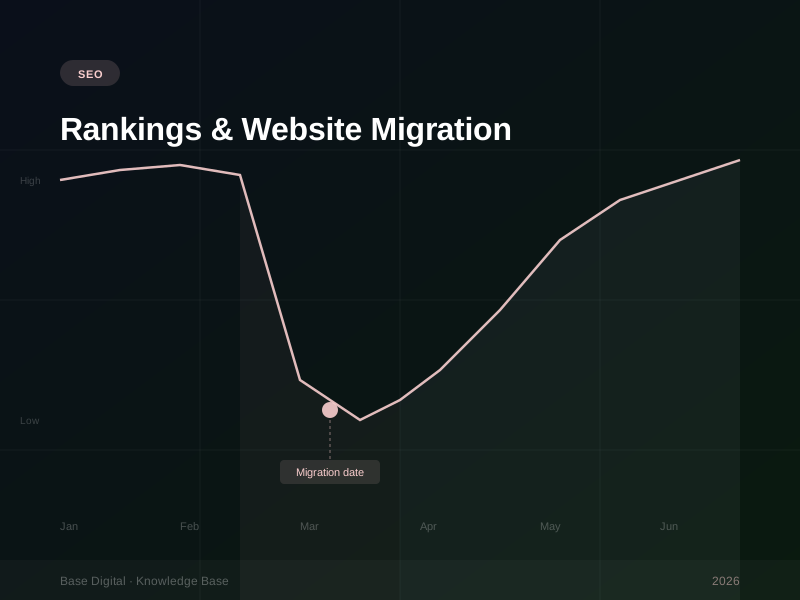
- Recovery timelines vary from weeks to months depending on the severity of the errors and the size of the affected site.
- Some ranking loss after migration is expected and temporary — the difference between normal fluctuation and a serious problem is in the data.
- If organic traffic has not substantially recovered within 90 days, escalate and bring in specialist help.
Website migrations are one of the highest-risk events in an SEO programme. Done well, they are invisible — traffic holds, rankings are maintained, the new site builds on the authority of the old one. Done poorly, they can erase years of accumulated ranking equity in a matter of weeks.
I have seen migrations go badly for brands of every size. A national retailer that lost 60% of organic traffic after a platform switch. A professional services firm that spent three months clawing back rankings that should never have been lost. In almost every case, the damage was preventable — and in almost every case, the root cause was one of seven identifiable mistakes.
This article walks through those seven causes, how to diagnose which one hit you, and the recovery plan. If you are reading this post-migration with traffic down, start at the diagnosis section. If you are planning a migration, read the pre-migration checklist first.
The pre-migration checklist
The most effective thing you can do for SEO during a migration is prepare thoroughly before you move anything. Here is what that preparation looks like.
Crawl your existing site completely. Use Screaming Frog, Sitebull or a similar tool to crawl every URL on the current domain. Export the full list of indexed URLs, their titles, meta descriptions, H1s, word counts, canonical tags, inbound links and status codes. This is your baseline. Without it, you have no way to confirm that the migration preserved what mattered.
Export all backlink data. Pull your backlink profile from Ahrefs or Semrush. Identify the highest-authority pages by referring domains — these are the pages where link equity is concentrated. Every one of these URLs needs a working 301 redirect if it changes.
Document all current rankings. Take a full keyword ranking snapshot before the migration using your rank tracking tool. If you do not have one, export ranking data from Google Search Console for the 90 days prior to migration. You need a benchmark to measure against.
Map old URLs to new URLs explicitly. Every URL that is changing needs a documented mapping to its equivalent new URL. This is not something to leave to inference or platform defaults. Build a spreadsheet, URL by URL, for any path that is changing.
Test the staging environment for crawlability errors. Before launch, crawl the staging site. Check for canonical tags pointing to staging URLs, noindex meta tags (commonly added to staging environments and often forgotten), broken internal links, and missing page templates. Fix everything before you go live.
"A migration without a pre-launch SEO audit is like moving house without checking that all the furniture fits through the door. You will find out the hard way, and the damage is avoidable."
The 7 most common causes of post-migration ranking loss
1. Missing or broken 301 redirects
This is the most common cause of post-migration ranking drops, and arguably the most damaging. When a URL changes and there is no redirect pointing from the old URL to the new one, any backlinks pointing to the old URL become dead-ends. Google devalues or eventually discards the link equity associated with that URL. Your rankings, which depend on that equity, drop.
The pattern to look for: pages that previously ranked well and had backlinks have disappeared from search results, and those old URLs now return 404 errors when crawled.
The fix: implement 301 redirects from every changed URL to its new equivalent. Redirect chains (where A redirects to B, which redirects to C) should be collapsed to a single redirect where possible. If you have hundreds or thousands of URLs affected, prioritise by backlink count — fix the highest-authority pages first.
2. Staging noindex tags left live on production
This one is embarrassingly common and catastrophically effective at destroying rankings. During development, it is standard practice to add a noindex directive to staging environments to prevent them from being indexed. The problem occurs when the site goes live and that directive — whether in the robots.txt file, the X-Robots-Tag header, or a meta robots tag — is not removed from the production environment.
Google will see the noindex signal, interpret it as an instruction not to index the site, and begin dropping pages from its index. Within days, rankings evaporate.
The fix: check robots.txt at yourdomain.com/robots.txt immediately after launch. Check the meta robots tag in your HTML source. Check server response headers using a tool like curl or a browser extension. If you see noindex anywhere on production URLs, remove it immediately and submit an urgent recrawl request through Google Search Console.
3. Canonical tag errors
Canonical tags tell Google which version of a URL is the "master" version that should be indexed. Migration errors often result in canonical tags pointing to staging domains, old domains, incorrect URLs, or simply pointing every page at the homepage. Any of these scenarios causes Google to misattribute or ignore the pages in question.
Check: crawl the new site and examine the canonical tag on every page. It should point to the correct, final production URL — matching the URL you want indexed, https and www/non-www consistent.
4. Loss of content or significant content changes
Redesigns often involve content editing or removal. Copy gets shortened for "cleaner" pages. Blog posts get deleted because they feel old. Landing pages get consolidated. Each of these changes removes content that may have been ranking. If your content was driving traffic, removing or significantly diluting it will cost you rankings.
Before the migration, identify every page driving meaningful organic traffic — even a small amount. Ensure equivalent or better content exists on the new site. If a page is being removed, either redirect it to the most relevant equivalent page, or keep it and update it.
5. Internal link structure degradation
Google uses internal links to understand site structure, distribute PageRank, and determine which pages are most important. A redesign that simplifies navigation, removes footer links, consolidates hub pages or introduces orphan pages (pages with no internal links pointing to them) can significantly weaken the internal link graph — and rankings follow.
After migration, crawl the site and check: are there orphan pages? Have the key category and hub pages retained their internal link counts? Is the hierarchy logical? Internal linking is one of the most under-attended SEO factors in migration planning.
6. URL parameter issues and duplicate content
New platforms, particularly eCommerce platforms, often generate multiple URL variants for the same content — sorting parameters, session IDs, filter combinations. Without canonical tags or URL parameter handling configured correctly, Google can see hundreds of near-duplicate URLs and struggle to identify the canonical version. This dilutes crawl budget and ranking signals.
Check Google Search Console's URL Inspection tool for unusual URL variants being crawled. Configure canonical tags for parameterised URLs and use Google Search Console's legacy URL parameter settings if the volume is significant.
7. Domain authority dilution from a domain change
If the migration involved a domain change — not just a redesign on the same domain — expect a more prolonged recovery period. Even with perfect 301 redirects, Google does not pass 100% of link equity through redirects to a new domain. The new domain starts from a lower authority baseline and needs time to rebuild its standing. This is not a mistake so much as an inherent cost of a domain change, but it is frequently underestimated in migration planning.
Diagnosing what hit you
If you are in post-migration damage control, work through this diagnostic sequence:
- Check noindex first. Visit yourdomain.com/robots.txt and view the source of your homepage. Look for "noindex" anywhere. If it is present on a production site, this is your primary issue and needs to be resolved today.
- Crawl and check status codes. Run a Screaming Frog crawl of the new site. Export all 404 and 5xx errors. Cross-reference these against your pre-migration URL list. Every 404 that existed previously needs a redirect assessment.
- Check canonical tags at scale. Export all canonical tags from the crawl. Look for canonicals pointing to staging domains, old domains, or the homepage where they should not be.
- Compare ranking data. Pull current rankings against your pre-migration baseline. Identify which pages or keyword clusters have dropped hardest. This tells you where to focus your content and redirect recovery.
- Check backlink 404s. In Ahrefs or Semrush, run a "broken backlinks" report for your new domain. These are backlinks pointing to URLs that now return 404. Each one is lost equity that a redirect could recover.
Priority order for fixes: Remove any noindex signals on production immediately. Implement missing 301 redirects for high-backlink pages. Correct canonical tag errors. Fix broken internal links. Address content that was removed or significantly thinned. Improvements in crawl coverage usually follow within two to four weeks of resolving these issues — rankings take longer.
How long does recovery take?
Honest answer: it depends on what broke and how quickly you fix it.
For straightforward redirect issues — where the fixes are implemented cleanly and no content was lost — partial recovery typically begins within four to eight weeks as Google recrawls and re-evaluates the redirected pages. Full recovery can take three to six months, because Google needs to re-establish confidence in the new URLs.
For noindex errors that were live for several weeks, recovery is slower because Google may have substantially depopulated its index of your site. Re-establishing full indexation can take six to twelve weeks after the noindex is removed, and ranking recovery follows after that.
For domain changes with incomplete redirect maps, recovery is the longest — often six to twelve months to return to pre-migration traffic levels, and some authority loss may be permanent if the redirect implementation was poor.
The single biggest variable in recovery speed is how quickly the errors are identified and resolved. Every week a noindex tag sits on a production site, every week broken redirects remain in place, compounds the damage. Speed of diagnosis matters as much as the quality of the fix.
When to bring in a specialist
You should seriously consider bringing in an SEO specialist if any of the following are true:
- Organic traffic has dropped more than 30% and has not begun recovering after 30 days of fixes.
- The site has more than 1,000 URLs affected by the migration.
- You are not confident you have identified the root cause from the diagnostic sequence above.
- The migration involved a domain change or platform change with significant structural differences.
- Organic search is a primary acquisition channel and the revenue impact is material.
A specialist who has worked through multiple migrations can compress the diagnostic and recovery timeline significantly. The cost of getting it wrong for another three months — in lost organic revenue, wasted ad spend filling the gap, and ranking positions ceded to competitors — is almost always higher than the cost of specialist engagement.
At Base Digital, we have run the recovery process on migrations across a range of platforms and site sizes. If your organic traffic is down post-migration and you want a clear picture of what happened and what the recovery path looks like, that is exactly the kind of audit we can run.